Run your bridal studio. And the business behind it.
Nisa Bridal Software manages the complete bridal journey from first enquiry to final collection. Clients, wedding dates, leads, appointments, consultations, fittings, quotes, orders, deposits, payments, balances, dresses, alterations, production, pickups and staff notes stay connected in one place.
This is not a generic CRM with bridal labels. It is finished bridal software built around how bridal studios actually work.
No credit card required. No per-user fees.
"Thaha quickly understood my complex needs and built a system that exceeded expectations."
— Esther Mander, VIP Pet Travel
The whole bridal journey, connected from the start.
A bridal studio does not just need a contact list or a booking calendar. Each bride brings a chain of work: enquiry, wedding date, appointment, consultation notes, quote, deposit, order, dress details, alterations, production, fittings, balance payment and pickup.
Nisa keeps that journey connected so staff can see what happened, what is due next, and who owns the next step.
New enquiries, lead source, service interest and wedding date.
Consultations, fittings, pickups, cancellations and follow-ups.
Draft orders, inventory items, custom charges and quote follow-up.
Confirmed bridal orders, service type, priority and client folder links.
Deposits, paid amounts, draft payments, balances and payment method.
Measurements, materials, sewing, embellishment, quality check and completion.
Fitting appointments, notes, changes and next steps.
Ready-for-pickup work, final balance and completed orders.
The problem is not one missing feature. It is the gaps between the work.
A bride calls and nobody can quickly see the latest quote, payment and fitting notes.
The answer should be in the client and order record, not split across messages and memory.
A consultation ends but follow-up depends on who remembers it.
Appointment outcomes should drive the next action: quote, follow-up, next appointment, order or closed lost.
A dress is in progress but the production stage is not visible to the front desk.
The team should know what is not started, in sewing, in quality check or ready for pickup.
A balance is due but the payment record is separate from the order.
Deposits, balances and payment status should connect back to the client and order.
A stylist needs the client folder but has to ask where it is.
Files, notes and folder links should sit where staff already work.
A manager wants to know what needs attention without rebuilding a report.
Leads, appointments, orders, production and payments should be visible through useful views.
Your software bill should not grow every time your team does.
Nisa does not charge per user. A bridal studio should not have to decide whether the receptionist, stylist, seamstress, fitter, manager or owner is “worth another software licence.”
One system. Your whole team. No per-user fees.
Finished bridal software, not a blank platform.
Bridal CRM
Client profiles, wedding dates, lead sources, service interests, notes and folder links.
Appointment management
Consultations, fittings, pickups, cancellations, no-shows and follow-up outcomes.
Order management
Draft, quote sent, confirmed, in production, fitting, ready for pickup, completed and cancelled stages.
Quote management
Inventory line items, custom charges, quote totals, quote follow-up and quote acceptance.
Payment tracking
Deposits, balances, paid payments, draft payments, cancelled payments and payment methods.
Inventory
Dresses, accessories, veils, shoes, prices, photos, SKUs, sizes, colours, status and location.
Production
Measurements/specs, materials preparation, sewing, embellishment, quality check and complete.
Staff handover
Notes, related records, attachments, comments, files and clear next actions.
Reporting views
Operational views for leads, appointments, orders, production, payments and inventory.
See the bridal workflow in use.
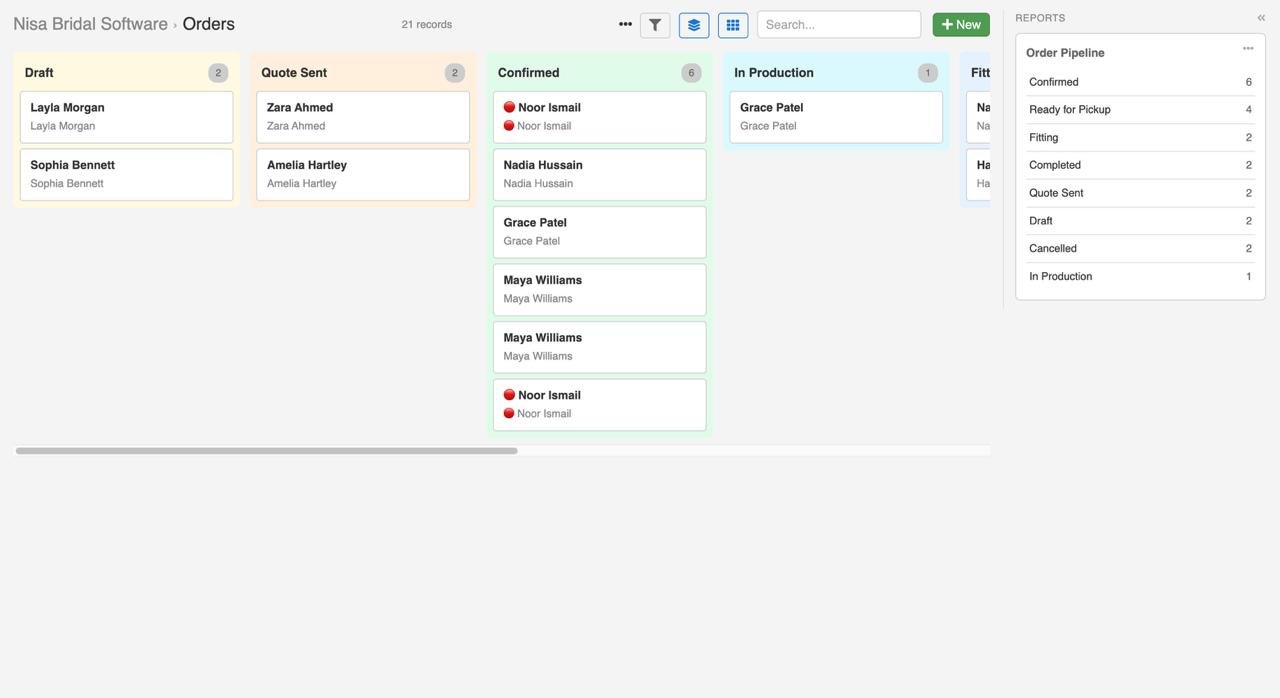
Order board
See every order by stage, from draft quote to completed pickup.
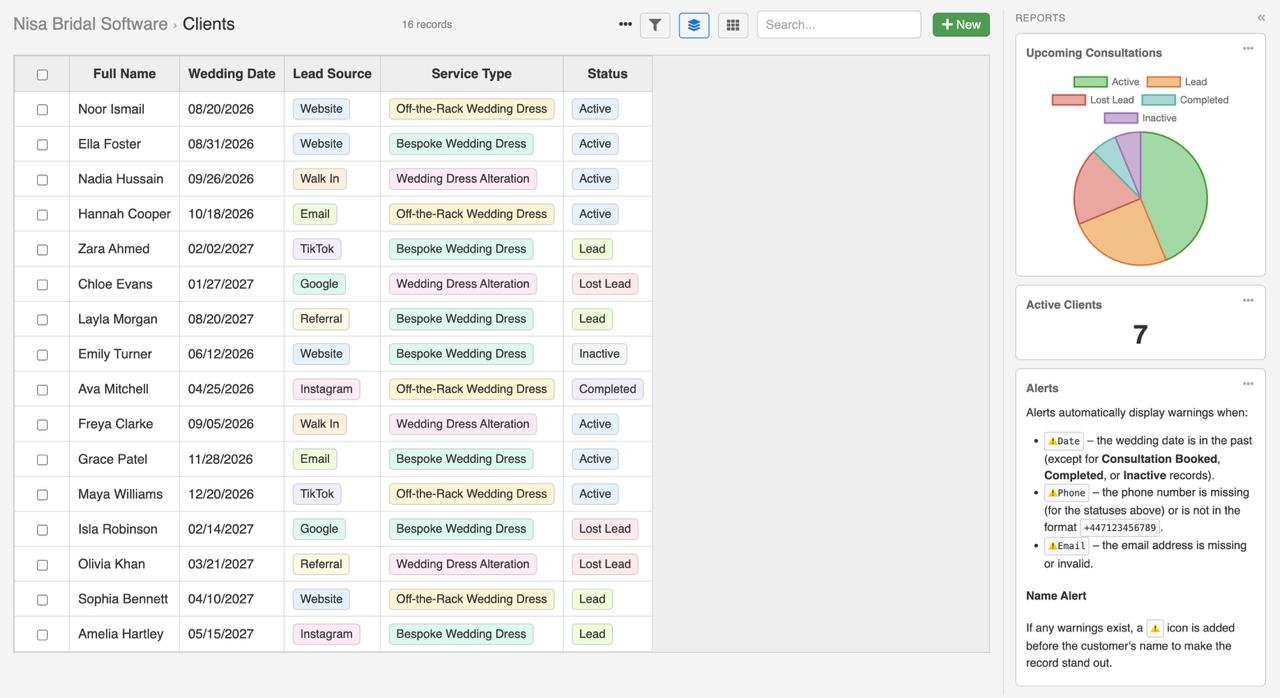
Client and appointment records
Keep wedding date, lead source, service interest, appointment history and next step together.
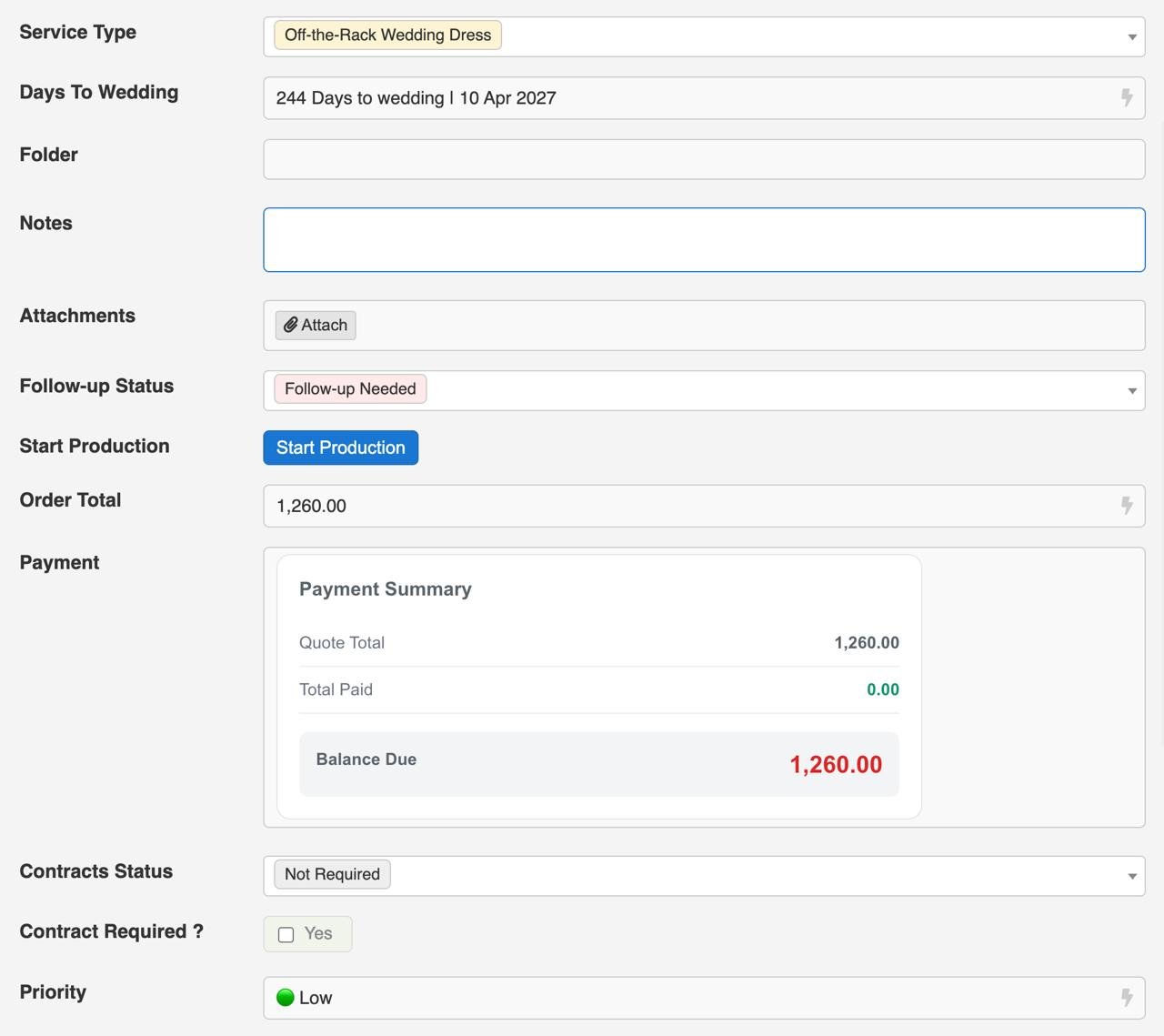
Payments and balances
Track what has been paid, what is still due and which order the payment belongs to.
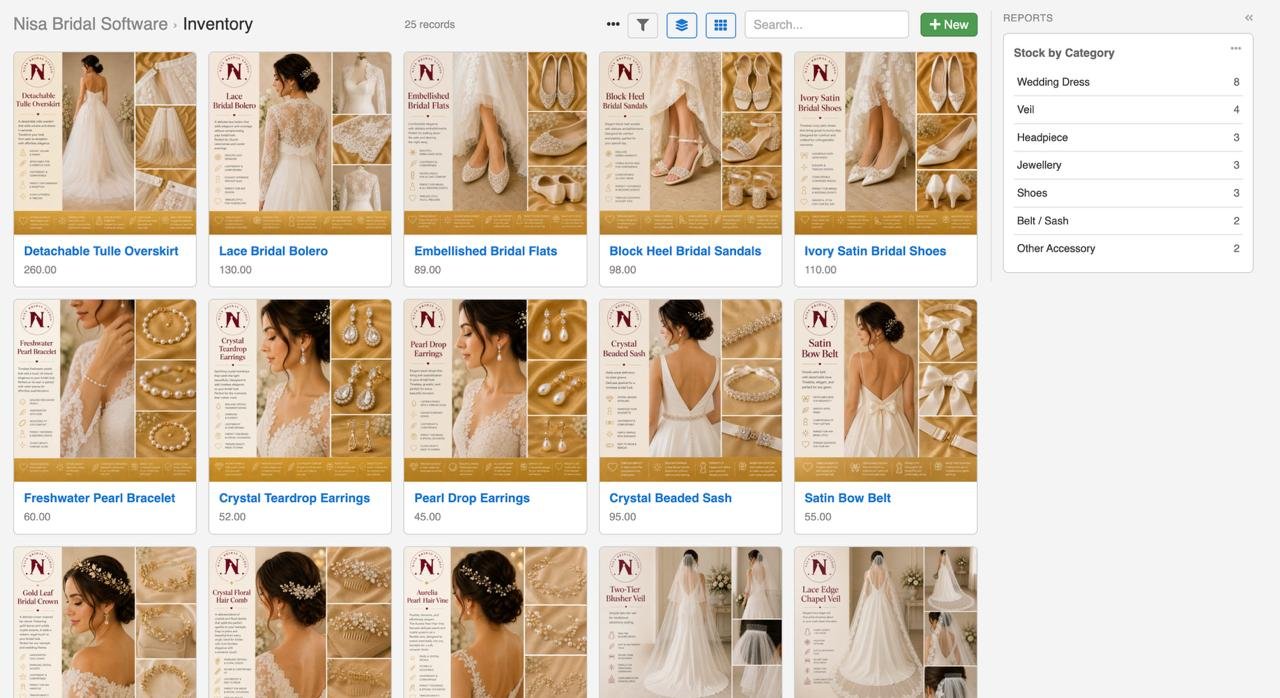
Inventory gallery
Use dresses and accessories directly inside quotes and orders.
Your bridal software should not be something you eventually outgrow.
Nisa gives you finished bridal software first. That is the product you use immediately.
Underneath, Nisa is powered by InfoLobby, a complete work management platform. That means the system can eventually support more of the business instead of forcing the studio to keep adding disconnected tools.
Nisa does not put a ceiling on how your studio can operate.
You can start with bridal operations now, then later connect HR, employees, leave, recruitment, sales, marketing, leads, tasks, suppliers, expenses, documents, internal requests, reporting, custom workflows and automations where it makes sense.
Built for bridal studios that want the whole team working from the same truth.
Nisa is strongest when the studio wants staff to stop chasing each other for updates and start using one shared operating system.
Questions bridal studio owners ask before choosing software.
Is Nisa Bridal Software a CRM?
It includes bridal CRM features, but it is more than a CRM. It also manages appointments, quotes, orders, payments, inventory, production, fittings, pickup and operational reporting.
Is Nisa only for appointments?
No. Appointment scheduling is one part of the workflow. Nisa connects appointments to clients, outcomes, quotes, orders, production stages, payments and pickup.
Do you charge per user?
No. Nisa does not charge per user. Your studio can involve the people who need access without buying another licence for each person.
What kind of bridal businesses is it for?
Nisa is built for bridal studios, bridal boutiques, wedding dress shops, alteration studios and bespoke bridal teams.
Can it manage inventory?
Yes. Nisa can manage dresses, accessories, veils, shoes, prices, photos, stock status, SKUs, sizes, colours, locations and product links.
Why does InfoLobby matter?
InfoLobby is the work management platform underneath Nisa. It lets Nisa grow beyond standard bridal software into wider business workflows such as tasks, employees, suppliers, documents, reporting, automations and custom internal processes.
Is Nisa a generic platform configured for bridal shops?
No. Nisa Bridal Software is a finished bridal system. InfoLobby is the platform underneath it, not the product story the studio has to figure out.
Run your bridal studio. And the business behind it.
Start with the full bridal journey: leads, appointments, quotes, orders, payments, production, fittings and pickup. Then grow the system around the business as the studio grows.